Every turn.Checked in CAD.
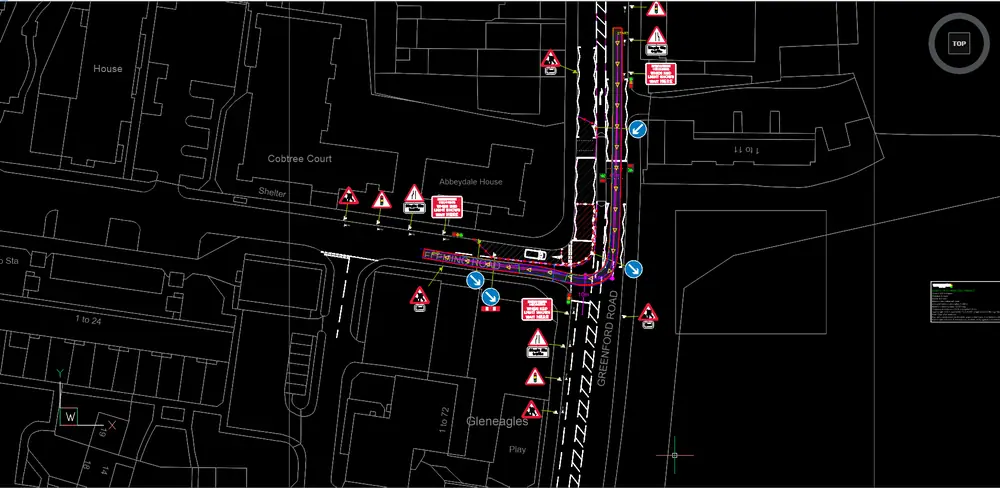
Vanguard Path runs swept path analysis inside BricsCAD. Choose a vehicle, draw or drive the route, and see the swept envelope, clearances and compliance on the drawing you are already working on.
Why we built it
Swept paths belong on the drawing.
A swept path check is only useful when it sits on the drawing it tests. Path keeps the vehicle, the route, the clearances and the report together, so a change to the layout can be checked again without leaving CAD.
We built Path for our own swept path work, so it follows the way our designs are checked and recorded.
How it works
Three steps. Then a report.
- 01 /
Choose the vehicle
Pick from a UK library of rigid, articulated, drawbar and bus vehicles. Length, width and maximum steer appear as you choose.
- 02 /
Draw or drive the path
Draw the route point by point, with clearances to kerbs shown as you go, or drive the vehicle with the mouse and record its path.
- 03 /
Read the result
The pass or fail result sits on the drawing. A PDF report with the job details is ready to send when you need one.
Features
Everything for a swept path check.
- UK vehicle library59 vehicles across rigid, articulated, drawbar and bus types.
- Forward and reverseModel forward movements, reversing manoeuvres, and paths drawn against the direction of travel.
- Articulated vehiclesTrailer tracking with a jackknife check at 90 degrees, plus the maximum articulation for each run.
- Clearance checksMeasure the swept envelope against kerbs and obstacles you select, with the clearance shown while you draw.
- PlaybackStep through the manoeuvre frame by frame, with the steering angle shown at each position.
- Compare vehiclesRun one path for several vehicles and see the results side by side on one comparison page.
- PDF and HTML reportsJob details, plan and side views, compliance against the legal length limit, and CSV data for each run.
- DXF and shapefile exportExport the envelope and wheel tracks as DXF on named layers, or as a shapefile with a British National Grid projection.
Benefits
Less redrawing. Clearer answers.
- Stays on your drawingThe analysis is drawn into your CAD file, so there is nothing to redraw in another package.
- Clear resultsPass or fail is shown on the drawing and in the report, with the reason stated.
- Ready for the fileReports carry the job details, and the exports carry the geometry for your own records and GIS work.
Your questions, answered
Before you ask.
What do I need to run Path?
BricsCAD Lite on Windows. The calculations run in a small program on your computer, so the analysis does not need an internet connection.
Can I compare vehicles on one layout?
Yes. Compare Vehicles runs the same path for several vehicles and shows the results side by side on one page.
Pricing
Get in touch with us.
To talk about pricing for Vanguard Path, get in touch with our team.